Contact
General HR questions: HealthHR@spd.in.gov
Location: 2N Meridian, 3rd floor
Fax: 317-233-7394
HR Director: Heather Whitaker | 317-605-4323 (call/text)
Senior HR Business Partner: Danielle Diaz | 317-232-0152
Senior HR Business Partner: Megan Bierl | 317-233-7522
Human Resources Business Partner: Jennifer Cross | 317-233-7620
Talent Acquisition Consultant: Emilee Houpt
Compensation Consultant: Anika Piana
Workforce Strategy & Performance Consultant: April Norton | 317-232-1398
Website: in.gov/spd | 855-773-4647
INSPD Benefits Division: Email | 855-773-4647, opt. 1
INSPD Career Assistance: Email | 855-773-4647, opt. 2
INSPD Worker’s Compensation: 855-773-4647, opt. 3
Employee Relations: 855-773-4647, op. 4
Family Medical Leave: 855-773-4647, opt. 4
Employment Verifications: 855-773-4647, opt. 5
Learning & Development: Email
Performance Management: Email
The details referenced herein pertain to state employees only.
Click here to view how we accrue vacation, personal, and sick leave. You can review your current balance and even forecast future balances via PeopleSoft HR > Employee Self-Service > Time > Absence Balances.
The Americans with Disabilities Act of 1990 is a wide-ranging civil rights law that prohibits discrimination based on disability. Resources for managers can be found here. Contact HR if a reasonable accommodation may be necessary.
There are many benefits of being a state employee. Check out all of these discounts here from SPD!
Below are discounts exclusive to IDOH staff:
| Location | Address | Discount | Expiration |
|---|---|---|---|
| Command Coffee | 55 Monument Circle #59 | Stamp Card each purchase. Weekdays between 2-5 pm: 2x stamps | |
| Encanto | 10 W Washinton St | $12 lunch specials (drink included), valid Monday through Friday from 11:00 AM – 3:00 PM. Employees will also get a 20% discount on dinner specialties, which are located on the 2nd page here. | |
| Five Guys | 48 E Washington St | Free drink with any order | |
| Sun and Moon Cafe | 10 W. Market St., Suite 100 | 10% off order with badge | |
| Illumine Coffee | 11 S Meridian St | $5 off for every 75 points you get using their reward system. Sign up in person or get the app Dripos. Every $1 spent is a point. | |
| Sushi Boss | 26 Monument Circle and 803 W Tenth St | 10% off $10 or more. Circle store only. Must be ordered from sushiboss.com or download the app by texting "sushiboss" to 33733. When ordering enter promo Code: sendsushi | valid until 12/12/2025 |
| Wei Ramen | 36 E Washington Street, Indianapolis, IN 46204 | 10% off order with saying "Shere" at time of order | |
| Wing Stop | 16 N Pennsylvania St. Indianapolis, IN 46204 | 10% off order with badge | |
| South Bend Chocolate Cafe | 30 Monument Cir, Indianapolis, IN 46204 | 10% off order with badge | |
| Enzo Pizza | 149 N Illinois St, Indianapolis, IN 46204 | 10% off order with badge | |
| Jack's Donuts | 135 W Market St, Indianapolis, IN 46204 | 10% off order with badge |
Click here for state ethics rules and procedures. Questions and/or concerns can be directed to the Office of the Inspector General or you are welcome to start with the Indiana Department of Health Ethics Officer, Rebecca Brelage.
When IDOH state employees resign, retire or transfer to another agency, they are asked to complete an anonymous exit survey providing feedback that HR de-identifies and shares with the executive team each quarter as a method to identify and action plan for opportunities for improvement. Click here to review past results. We encourage you to share suggestions for improvement through your leadership chain to help in these efforts.
State Employee Hiring Process Resources:
- IDOH Hiring Process Instruction Guide
- Hiring Process Checklist
- Training: Conducting Effective Interviews
- Training: Indiana Manager Central
- Training: Hiring Efficiencies
- Final Candidate Justification Form
- Job Bank Posting Details
Contractor Hiring Process:
- Contact IDOH Finance to hire a contractor.
- To create, deactivate, or make changes to a contractor PeopleSoft ID, use these instructions.
PCN Change Request Process:
(Use for requests related to reclassification, convert contractor, add positions, pay adjustments)
A complete list of the current year’s state holidays can be found here.
Through Invest In Your Health, you have access to programs and resources to help make lifestyle changes to prevent disease and improve your health and wellness.
View a complete list of job codes, classifications, and families.
Per the State of Indiana Employee Handbook, you are eligible for leave without loss of pay for serving on a jury. You are paid your salary, less any amount received from the court, excluding expenses. If you serve as a witness in matters relating to employment with the state you may also be eligible for leave without loss of pay. Unpaid leave is granted in instances where you are subpoenaed in non-job-related matters. All leaves must be requested in writing and approved by the appointing authority within your agency.
Instructions: When you call the night before, you should find out at that time whether or not you must report to Jury Duty the next day. If you are required to report to Jury Duty, you must notify your supervisor at least one hour before the start of your shift. If you are called in for Jury Duty, you will receive a document detailing this from the Jury Duty Coordinator or designee on that day. You will also receive a check at some point for your jury duty. It will not equate to your normal daily rate so you will be compensated by the Department of Health for the difference. Please work with our Payroll Coordinator (Payroll20@health.in.gov) on this.
Summary of your responsibilities:
- Notify your supervisor immediately of your possible Jury Duty.
- If required to report to Jury Duty, you must also notify your supervisor at least one hour prior to the start of your shift.
- Do not waive entitlement to the jury duty fee.
- Turn over the jury duty fee to our Payroll Coordinator.
- Submit the court documentation to our Payroll Coordinator as proof of appearing for Jury Duty.
- Record time on the timesheet for reporting / serving for jury duty as “Jury Duty.”
Below is Family Medical Leave (FML) and Short Term Disability (STD) information, forms and instructions.
How To – Understand Medical Leaves
Expecting a child? Click here for full instructions/forms.
FML for employee’s serious health condition: Please have your healthcare provider fill out the “Certification of Health Care Provider for Employee’s Serious Health Condition”. Once you have that completed form, you will need to submit an FML request for approval via PeopleSoft. You can either attach the form completed by your doctor to your PeopleSoft request or you can fax the form to the FML team at 317-974-2029. Forms and instructions can be found here.
FML for employee to care for a family member: Please follow the same process as outlined above; however, the required form is different. The family member’s healthcare provider must complete the “Certification of Health Care Provider for Family Member’s Serious Health Condition” found here.
For Disability (if needed): If there is a chance that a leave for the employee’s own serious health condition may last more than 30 consecutive calendar days, then the employee must apply for the state’s Short/Long Term Disability plan. To begin the claims process, you will need to complete the EE Claim Statement, EE Options Statement, and EE Authorization to Release Medical Information and your doctor will need to sign the Attending Physician’s Statement. Human Resources will complete the Employer’s Report of Claim form. All forms can be faxed directly to our disability provider, JWF Specialty, at 866-893-4674. The employee forms can now be completed online if you prefer. Forms and instructions can be found here. Please note that disability has a thirty (30) day elimination period from the beginning of the leave until payment will begin. Begin your claims ASAP to avoid delay.
When you are ready to return to work: Please have your doctor write a letter/note releasing you to work and submit it to HR prior to your return. If you have any restrictions at that time, have him/her explain these in the letter to include an anticipated date with which the restriction(s) should end. You are NOT permitted to return to work without written consent from your doctor.
FML Training Resources:
Family Medical Leave | 855-773-4647, option 4
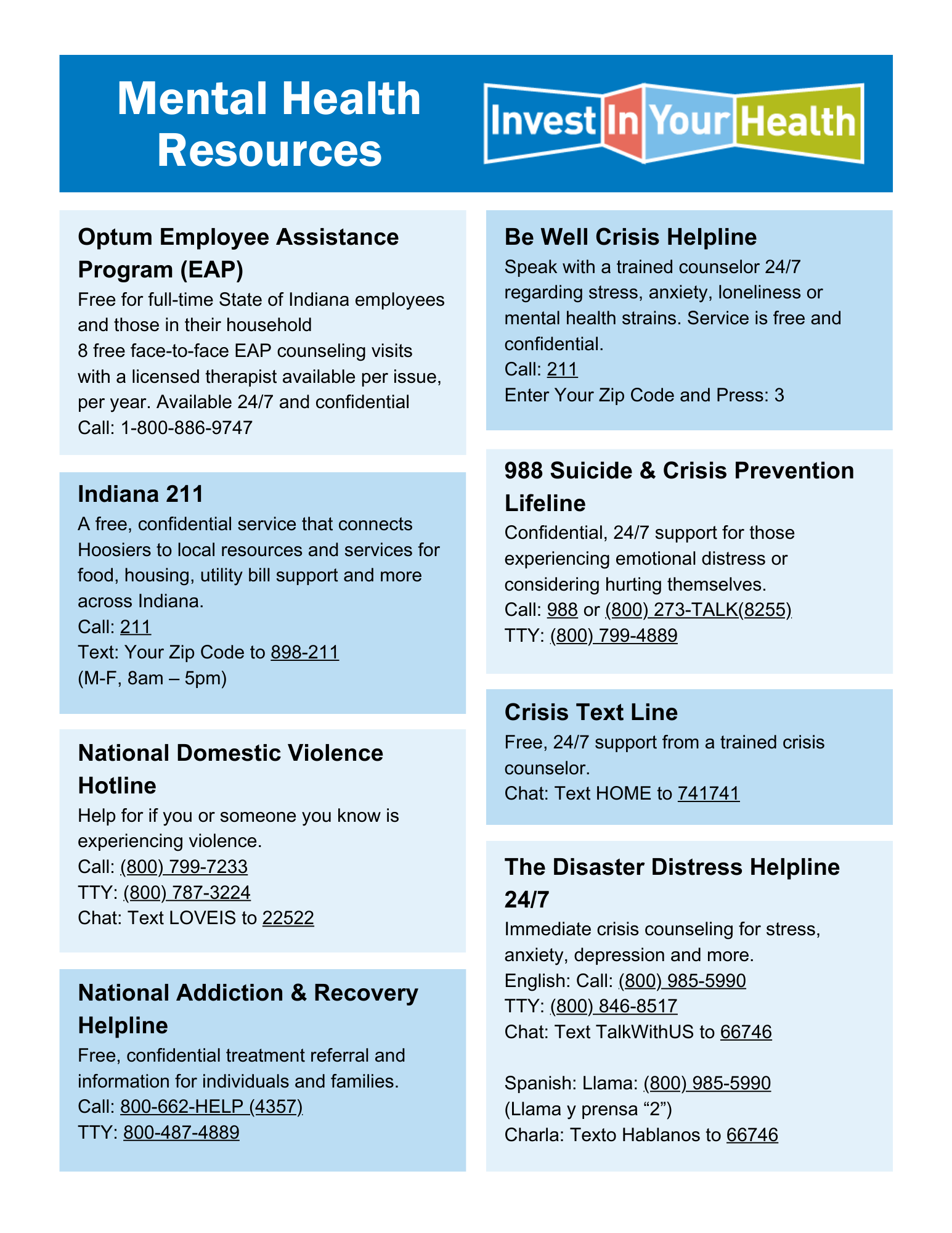
STATE EMPLOYEES: The Employee Assistance Program (EAP) is free to all state employees and their household members. The goal of the EAP is to help you cope with the challenges happening in your life – whether it’s concerning financial issues, emotional well-being, addiction and recovery, or other life events, click here to review the Optum EAP services that are available to you. If you would like to speak with a real person call (800) 886-9747 (24/7 support).
PUBLIC RESOURCES: While the EAP is a resource meant only for state employees, anyone can use the seven other resources found in this Mental Health Resources Flyer.
Onboarding
Welcome to the Indiana Department of Health! New employees should receive first-day instructions from HR and their supervisor. Click here for more information including new employee paperwork, required training, and helpful resources. Click here for our New Employee Checklist. Questions pertaining to your first paycheck should be directed to our Payroll Coordinator at payroll20@health.in.gov.
Offboarding
Thinking of resigning or retiring? Click here for more helpful information. Questions pertaining to your last paycheck should be directed to our Payroll Coordinator at payroll20@health.in.gov.
Click here to view the Indiana Department of Health’s director-level organizational chart.
Payroll and PeopleSoft Time & Labor is managed within the Finance Division. Contact the IDOH Payroll Coordinator at payroll20@health.in.gov with any questions and/or concerns.
View the Performance Management Process and Training Schedule.
Each year, state agencies set goals for the year ensuring continuous improvement in results achieved over last year, working towards creating a performance excellence environment. Do you know how your individual performance expectations directly support and contribute to the success of your division and your agency? Do you know how success on each of your expectations is measured? If not, engage your supervisor in a discussion.
The INSPD Workforce Strategy & Performance Management team delivers year-round training on topics such as goal setting, SMART goal action plans, improving poor performance with intervention, working tests (relevant to classified employees only), effective evaluations, feedback, self-assessments, etc. Search and register via SuccessFactors Learning.
How To Resources:
Address Change
- Log in to PeopleSoft HR and follow this navigation to update your address: Employee Self Service > Personal Details > Addresses > Home Address > Edit > Save. This will change your address with insurance providers, if applicable, and with payroll.
- Contact UMB if you have a Health Savings Account at 866-520-4472.
- Contact the Indiana Public Retirement System (INPRS) at 1-844-GO-INPRS.
- Contact Hoosier START, if applicable, at 1-888-401-5272.Name Change
Name changes require an updated social security card as proof of the legal change. Please provide this to HR and indicate your current First Middle and Last Name either via secure email (enter “3ncrypt” in the subject line) or fax to (317-233-7394). It takes approximately 48 business hours to complete this change within the HR system. Anthem and the Auditor of State (payroll) will be notified of your name change via automated INSPD processes. Additional instructions:
- Contact UMB if you have a Health Savings Account at 866-520-4472.
- Contact the Indiana Public Retirement System (INPRS) at 1-844-GO-INPRS.
- Contact Hoosier START, if applicable, at 1-888-401-5272.
- Contact Admin Services to obtain a new state-issued ID badge.
- Submit a helpdesk ticket here to request an update to your email address.
NOTE: If your name is changing due to marriage or divorce, contact the INSPD Benefits Division within 30 days of the effective date to make any necessary changes at spdbenefits@spd.in.gov or 855-773-4647, option 1.
- Marriage: If after 30 days you do not add your spouse and any eligible dependents to your insurance, you will not be able to do so again until open enrollment for coverage effective January 1 of the next calendar year.
- Divorce: If after 30 days you maintain ineligible dependents on your insurance coverage, you could be subject to discipline per the Dependent Eligibility Verification Audit policy.
- Employee Handbook (for all employees)
- Standard SPD Policies (for all employees)
- IDOH Policies (for only IDOH employees).
The Pulse Survey is your chance to voice your concerns, share your thoughts, and help make the Department of Health a more inclusive and welcoming place to work. The feedback you provide informs policy and workforce decisions that improve the employee experience statewide. Many of the Next Level policies announced by Governor Eric J. Holcomb in early 2022 were a result of feedback collected from previous Pulse Surveys. Click to view:
2025 Q3 Overall Results and Division Scores
2024 Q1 Overall Results and Division Scores
2023 Q3 Overall Results and Division Scores
2023 Q1 Overall Results and Division Scores
2022 Q1 Overall Results and Division Scores
2022 Q3 Overall Results and Division Scores
The Spot Bonus Recognition Program was created in an effort to recognize exceptional work efforts. Employees who demonstrate exemplary service that results in tangible and measurable cost savings or achievement for the agency may be nominated for a Spot Bonus Recognition Award.
Click for the nomination form.
Click for the Spot Bonus instructions and approval process PDF.
Spot Bonus parameters:
- A spot bonus is a one-time lump sum payment paid on an employee’s paycheck (subject to taxes and other deductions) following approval.
- Any state employee who has more than three (3) months of service can be nominated by any other state employee.
- Performance and discipline will be considered as part of the approval process.
- No individual spot bonus can exceed $1,000.
- Individuals are limited to a gross maximum of $2,000 in spot bonuses per fiscal year.
- Policy Reference: Statewide Spot Bonus Policy (in.gov)
While not all inclusive, the following chart provides examples of various scenarios with a suggested monetary amount.
|
Spot Bonus Amount |
Example Behaviors |
Spot Bonus Amount |
Example Behaviors |
|
$250 |
|
$500 |
|
|
$750 |
|
$1000 |
|
The state provides a Worker's Compensation Program for all employees, as required by Indiana Code 22-3-1-1 through 22-3-12-5. The purpose of the Worker's Compensation Program is to provide the statutory benefits afforded to an employee that is injured in the course and scope of his or her employment. The state takes seriously the responsibility of providing high-quality medical care with the goal of a full recovery and returns to work. Click here to access the Worker’s Compensation Handbook.
ACTION REQUIRED:
- Complete the First Report of Injury form and return it to HR immediately. If the employee is seriously injured and cannot complete this form, the supervisor should complete it once the employee is safely with medical professionals. See #3 below.
- Complete the Incident Report and submit it to Patrick Brown.
- Medical Assistance.
- For non-life-threatening injuries, click here for a list of designated clinics should the employee wish to seek medical attention
- NOTE: The closest facility to 2N and the lab is Concentra at 500 N Capitol Ave, Indianapolis, IN 46209
- If the injury is life-threatening, a staff member should call 911 for medical assistance. Then contact the following by location for notification purposes:
- For non-life-threatening injuries, click here for a list of designated clinics should the employee wish to seek medical attention
- 2N Meridian, Mainscape, Shadeland, Warehouse, Field Staff – Call Patrick Brown at 317-719-8198
- Labs – Call 317-921-5601