Wage Reporting: Need to Know
Making a Payment
If the account is not in good standing with DWD, the Employer will be alerted via the ESS dashboard.
To make a payment on ESS, Login and go to Make a Payment on the left hand drop down.
Please note: you will need to file your wage report for the given quarter before making the payment to appropriately see what is due. |
To change the amount of the payment or determine what liabilities are included in the payment amount, please expand the Total Due field by clicking the white triangle to the left of the word total.
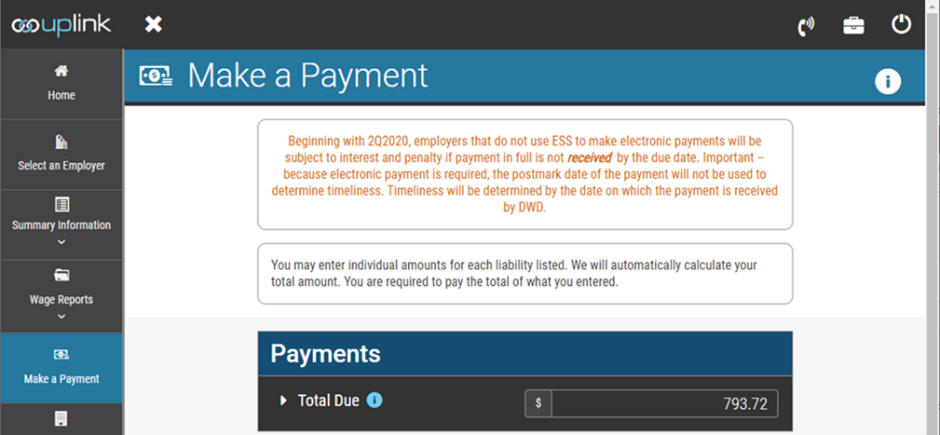
Once the total due section is expanded (the white triangle is pointing down), click the X next to any amount to edit the amount that the employer is paying. Payments must be at least one dollar ($1.00) for electronic payment. |

If the employer is only paying the current liability due, edit all other liability types to zero(0). If the employer wants to remove the predecessor liability, expand the section by clicking the black triangle next to the word “predecessor.” |

Click the X next to the predecessor liability amount to remove/edit it. When clicked, the X will turn into a refresh symbol, and the total |

Once the white X is a refresh symbol, the amount box can be edited to another amount if the employer wants to make a partial payment. |
Amounts in warrant will not appear as eligible to make a payment. Warrants must be paid through the Sheriff of the County where the tax lien was recorded. Predecessor liabilities are indicated on the payment screen as a consolidated amount, IC 22-4-10-6 . Expand the section to see the name and account number of any predecessor with open liabilities that are impacting the employer’s merit rate . The existence of a predecessor liability makes the employer delinquent for merit rating purposes. Predecessor liabilities do not prevent an employer from receiving a clearance to do business with the State of Indiana .
Under 646 IAC 5-2, the agency requires electronic payments. Electronic check payment is always fee free. Credit cards are accepted but the user is required to pay the merchant cost in the form of a courtesy fee for using this service. If an employer is unable to make an electronic payment, the employer is responsible for the delivery of the payment to DWD on or before the due date. The postmark date is not used to determine the timeliness of the payment where the employer has a real-time payment option available via E S S. |
DWD offers two portals for electronic payments, both administered for DWD by Value Payment Systems (VPS). DWD also offers ACH Credit payments via EDI as explained in the section below.
The recommended payment method is the integrated payment option that is linked from DWD to VPS. This option is a real-time interface to make payments for any type of debt except a tax warrant. Tax warrants must be paid to the sheriff of the county in which the warrant was issued.
The second method is to visit https://payingov.com/dwd and select Employer Liability Payment from the payment type field. This website allows an employer to set up reoccurring payments, email reminders, future one-time payments, and same day payments.
If your account is not in good standing and has been referred to the collection and enforcement division, please see the section on DWD collection actions.
If payment on an employer’s account is received via any method except E S S real-time payment, the payment is applied to the oldest outstanding liability not in warrant. The payment is not applied to the most recent quarter filed unless the employer is in good standing. If the employer is in a repayment agreement, making a current quarter payment via any method except E S S can put the employer agreement in default. |
Debit Blocks
If you have a debit block or positive pay mechanism attached to the bank account being used by the employer to make electronic payment, please provide the payer bank with the necessary exceptions to prevent the payment from being returned to DWD as a dishonored payment. If the employer has two dishonored payments via electronic check, DWD’s provider will block the same routing number and bank account from being used to process a payment under certain Federal regulations related to bank fraud.
If using any VPS payment method, the number required to authorize the transaction on an account with a debit block is T356000158 for e-check and 9803595965 and 1264535957 for debit or credit cards.
Credit cards are processed by World Bank. E-Checks are processed by T-Tech on behalf of VPS.
If a payment is dishonored by the maker bank, the employer may be assessed both interest and penalty as a result. DWD does not consider the use of debit blocks or positive pay to constitute reasonable cause for failing to timely pay an unemployment assessment.
WARNING: Using the incorrect SUTA account number when making a payment either electronically or by physical check creates a hardship on the employer’s SUTA account which was used in error and on the correct SUTA account as it will show as unreported or unpaid. DWD actively works to prevent overpayment of liability on an employer’s account when using the E S S integrated payment mechanism. If reporting or making payment using any mechanism other than E S S, the reporting party is responsible for any liability created or paid under the account number used. DWD does not move payments between SUTA accounts. To prevent errors and expense to the payer related to making a payment to the wrong account, we strongly recommend using E S S for all transactions and payments. To be clear – E S S is the prescribed reporting and payment method for the Agency as described in the Act and in Indiana Administrative Code. |
The E S S home screen will alert the employer if the account is not in good standing with the DWD.
ACH Credit Addenda Info
EFT / EDI using CCD+ or CTX 820:
DWD now accepts ACH Credit with a correctly formatted addenda record. Please consult with a bank or other payment processor if unfamiliar with these requirements before making a payment using this method.
Please contact DWDESSCommunications@dwd.IN.gov for the appropriate bank account and routing numbers.
| Element | Comments | Content | Attribute 1 | Attribute 2 | Attribute 3 |
|---|---|---|---|---|---|
| N/A | Segment Identifier | TXP | M | ID | 3/3 |
| TXP01 | Tax Identification Number | Employer SUTA | M | A N | 1/20 |
| TXP02 | Tax Payment Type Code | 130 | M | ID | 1/5 |
| TXP03 | Date | CCYYMMDD | M | DT | 8/8 |
| TXP04 | Tax Information ID Number | Employer F E I N | M | A N | 1/30 |
| TXP05 | Tax Amount | $$$$$$$$CC | M | N2 | 1/10 |
Each element is separated by an asterisk (*). Payments will be posted to the account as identified in TXP01. The payer is responsible for the accuracy of this information.
Sample addenda record 705TXP*111111*130*20210930*123456789*000726648 5\
Credits and Refunds
DWD will automatically uses any credits on an account when a new liability appears. |
Where an employer has a valid credit on their account, an employer may choose either to have that credit applied towards future assessments, until used in full, or request a refund.
DWD prefers that employers request a refund in E S S. If an employer is unable to request a refund in ESS, the employer should call or send in a letter to initiate a refund request.
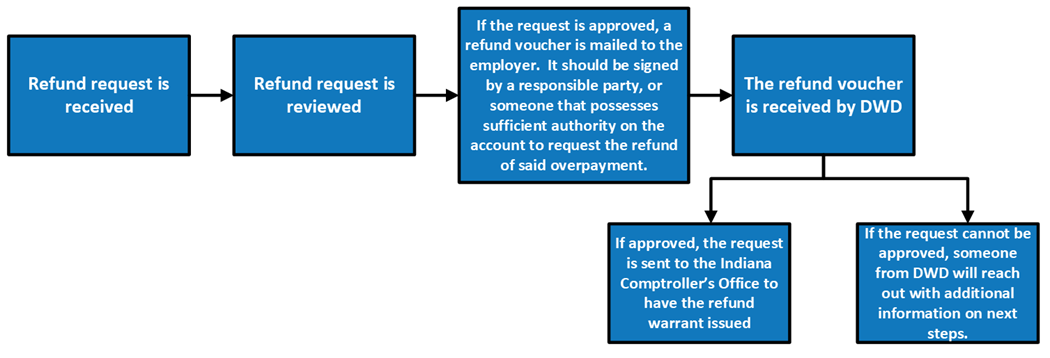
Per IC 22-4-32-19, not later than four (4) years after the date upon which an assessment is made, an employer must request a refund for any payments believed to be erroneously paid or wrongfully assessed. DWD does not allow credits that have aged over four (4) years to be refunded, in whole or in part, nor can they be applied toward future assessments. It is the employer’s responsibility to monitor their account regularly to ensure that any valid credits are refunded, or fully applied to future assessments, before aging over four (4) years. Non-refundable credits remain as part of the employer’s experience balance, but cannot be refunded once they have aged past four (4) years. |