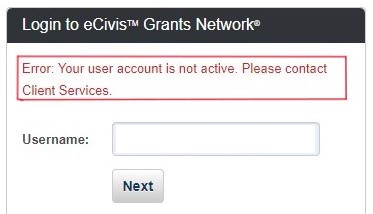
State Agencies - Login information
1. Navigate to Euna Grants Network at https://gn.ecivis.com/GO/gn_home
2. Enter your State of Indiana email address in the “Username” field & select Next. You do not need to enter a password.
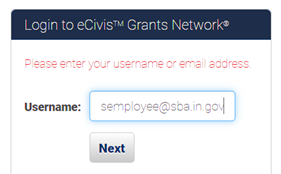

Applicants/Subrecipients - Login information
1. Navigate to the Euna Grants Portal at https://portal.ecivis.com/#/login
2. First Time users will need to create an account by clicking on "Create an account".
3. Returning users will click on "Portal Login" to access their account.
Troubleshooting Notes - Applicant/Subrecipient portal
Be sure you’re clicking on the Portal Login button and not the Grants Network login button. Only use the Grants Network login if you have an Euna Grants Network Account.
If you experience problems logging in, please be sure to try these steps
- Try a different browser (Firefox or Chrome work the best)
- Clear your cookies and restart your browser (CTRL+SHIFT+DELETE on most browsers)
- Enable cookies in your web browser (This can usually be the culprit in most cases)
- To do this, in Chrome complete the following:
- Step 1: Go to Google Chrome Settings
- Step 2: Click on Privacy and Security
- Step 3: Select “Allow all cookies”
- To do this, in Chrome complete the following:
- Lastly, if none of those options work, try a private or incognito window
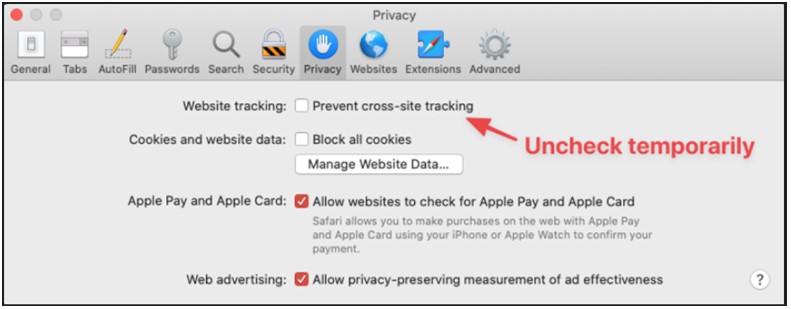
If you are using an Apple or MAC computer, please be sure to uncheck the box for "Prevent cross-site tracking" under Settings - Privacy
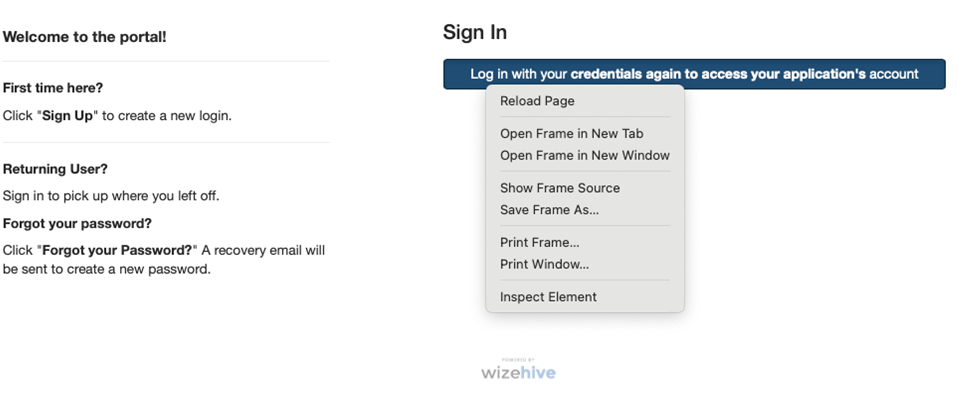
If MAC users are still experiencing problems with the second log-in, please try using Command Shift (right-click) on the log in button and choose "Open Frame in New Tab or Window"
Troubleshooting Notes - Euna Grants Network (State Employees)
- State Agency Users: if you have not logged into Euna Grants for an extended period of time, your account might become inactive.
To reactivate your account, please contact SBA customer support.