General Questions
Access Indiana is the State of Indiana’s single sign-on portal. Citizens can have one user name and one password to easily and securely login into multiple online services.
Access Indiana was created to make it easier for Hoosiers to do business with the state. In order to deliver great government service, a single sign-on, one login and password, gets individuals into multiple systems.
Check the Available Services (https://www.in.gov/access/available-services.html) to see a list of all online services utilizing the Access Indiana login.
Once a citizen creates an account, they can utilize the same user name and password to access any of the services listed under the Available Services tab.
Access Indiana account information is just as secure as all other state information. There are a variety of security safeguards in place to ensure that data is kept safe and secure.
Access Indiana is a method to log into systems, however each service still requires a user to answer authorization questions. This verifies that only the true user is accessing their account information.
Access Indiana is currently limited to the accounts listed in the Available Services tab. More services are being added as Access Indiana expands.
Currently, the only information maintained by Access Indiana is the information collected at sign-up: name, phone number and address.
If a service is not listed on Access Indiana, search on IN.gov to find the service and navigate to it.
If you need to get in touch with support for help, please call (866) 960-3023 during our hours.
Support hours are 8am – 9pm on Monday - Friday and 9am – 1pm on Saturday.
Account Questions
Go to Profile in the top-right of your screen and under Recovery Email Address click Change Recovery Email on the right.
You can find instructions on how to update your email address in Access Indiana here: https://www.in.gov/access/getting-started.html#help-email
STEP 1
Enter your Access Indiana primary email address.
Click Continue.
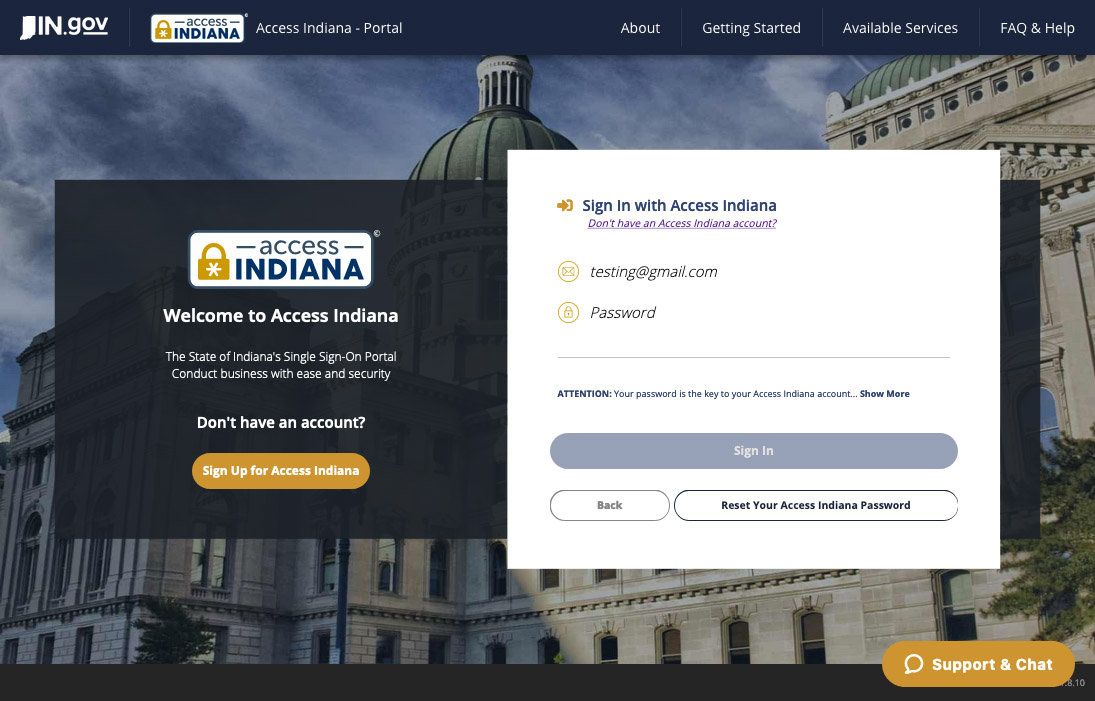
STEP 2
Click Reset Your Access Indiana Password.
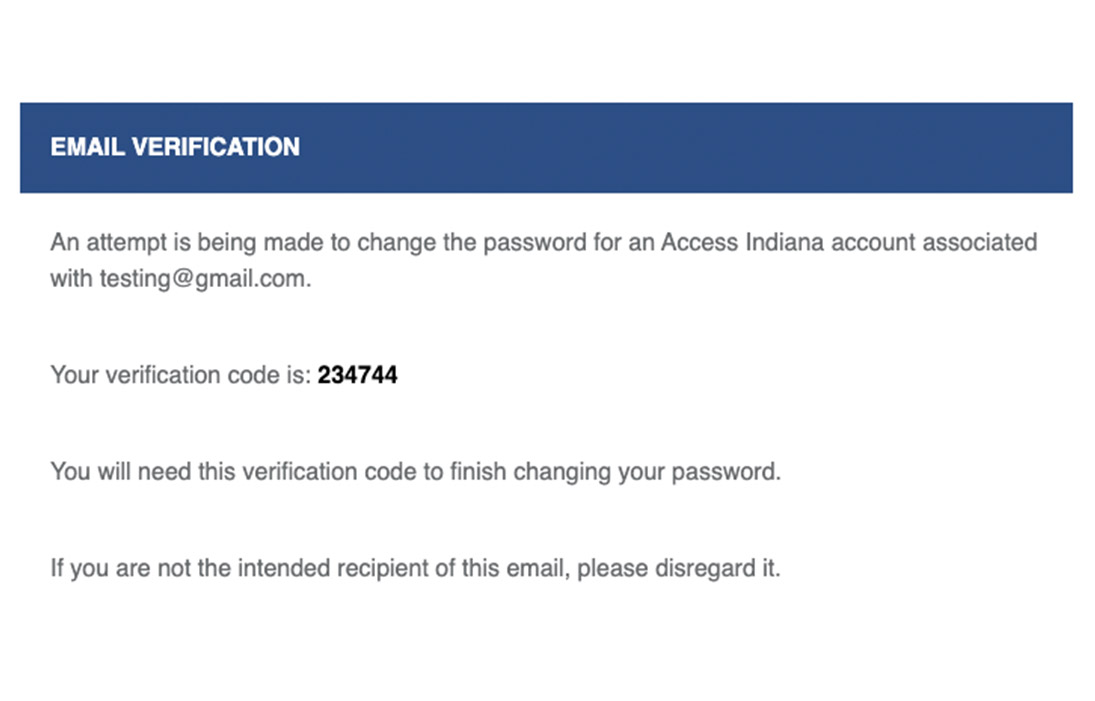
STEP 3
Open a new browser tab or window to check your email for a message with the subject of Access Indiana Password Reset.
Copy or write down the verification code.
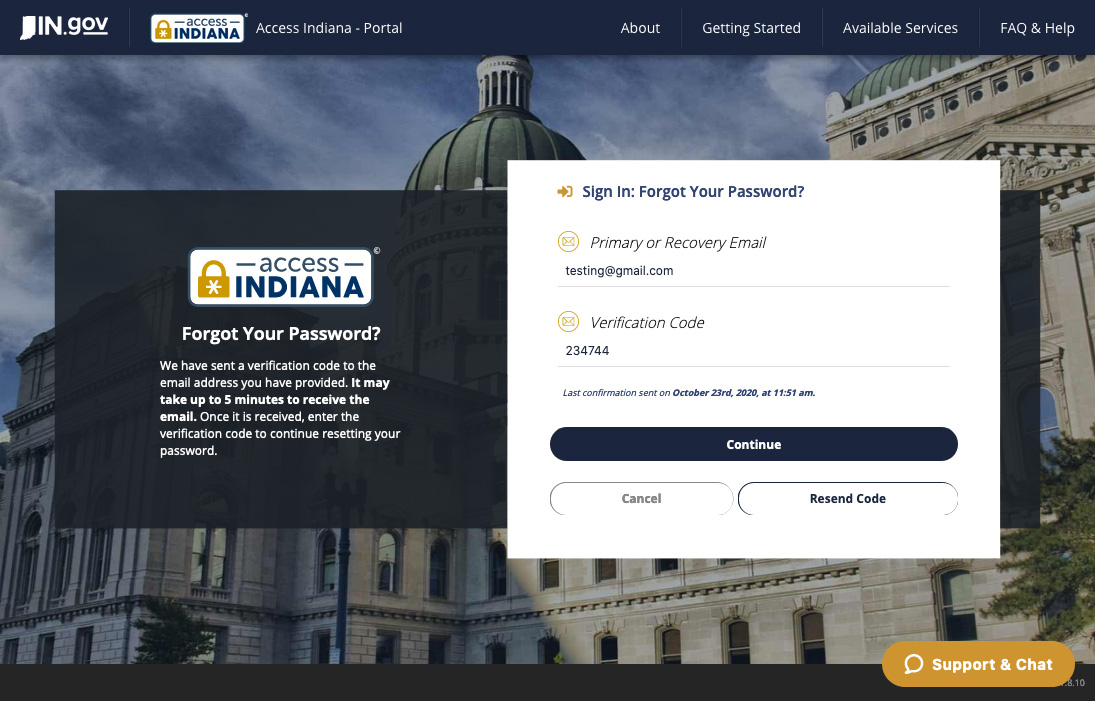
STEP 4
Under Verification Code, paste or type the code.
Click Continue.
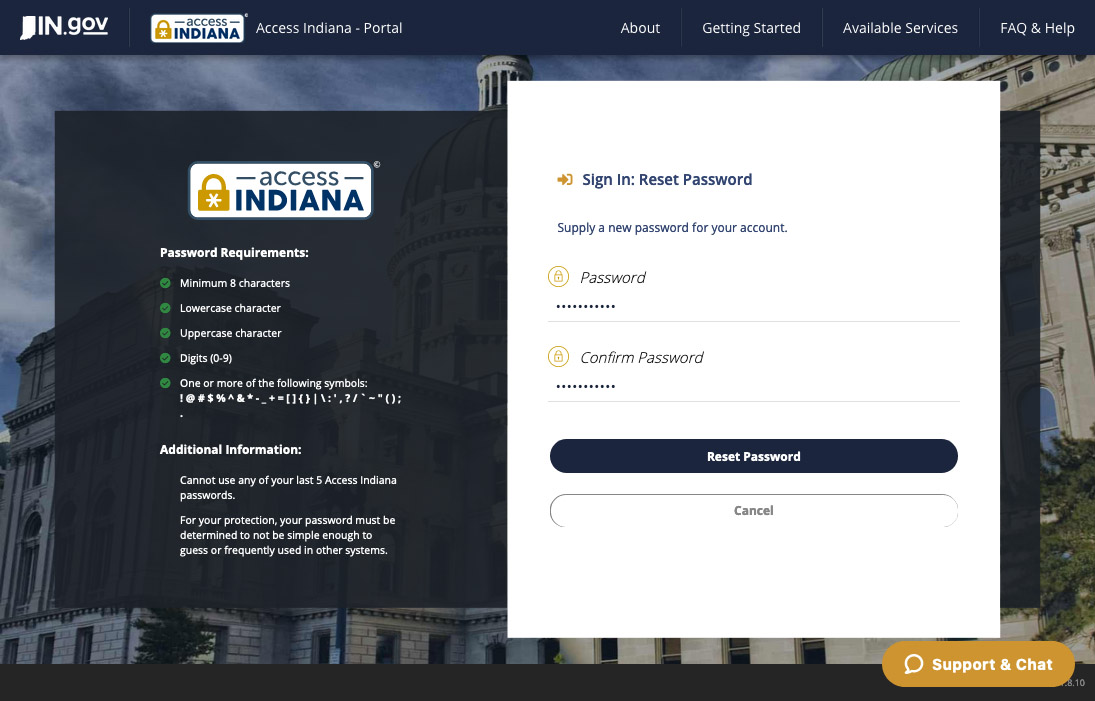
STEP 5
To reset your password, enter a new password then enter again to confirm.
Click Reset Password to complete the process.
If you no longer have access to the email account that you used at account creation, you can still login with your username (email address) and password. Once logged in, you can change your primary email address from the Access Indiana dashboard (https://access.IN.gov).
It is recommended during account creation that a user add a secondary email address that can be used to recover an account.
If you do not know your password and cannot access either email account, you will need to create a new Access Indiana account.
Each person conducting online activity with the State of Indiana should have their own Access Indiana account.
Currently, the only way to confirm your account is through the verification code in the confirmation email. If you have not received the confirmation email, first, check your spam folder. If there is not a message there, verify that you have entered in the correct email address in Access Indiana. If you are still having trouble, please try to sign up for Access Indiana again. If you continue to experience difficulties with signing up for an account, go to https://www.in.gov/access/getting-started.html or call (866) 960-3023 to reach customer support for Access Indiana.
To sign up for Access Indiana, you can click here or go through your desired application’s login and follow the instructions found in the Getting Started section.
Don't have an email address?
There are a number of email providers who offer an email address and services at no cost. A few popular email providers are listed below. These are commercial provider organizations, and are not affiliated with the State of Indiana. Your email messages will not be seen by or stored on State of Indiana systems.
- Gmail: https://www.google.com/gmail/about/#
- Yahoo Mail: https://login.yahoo.com/account/create
- Microsoft Live Hotmail: https://outlook.live.com/owa/
No, Access Indiana will let you use the same login and password to enter a service. Each service may ask some additional questions to verify a user’s identity.
At this point, there is no way to update a change in profile information across all services. There are plans to include this feature in the future.
Make sure that your password meets all of the requirements. Passwords must be at minimum 8 characters long, and contain each of the following:
- Lowercase character
- Uppercase character
- Digit (0-9)
- One or more of the following symbols: ! @ # $ % ^ & * - _ + = [ ] { } | \ : ' , ? / ` ~ " ( ) ; .
There is no cost to users to create an account.
If you have an existing account with one of the services included in Access Indiana, during the sign-in process, the two accounts will be linked together.
Only the user can see the services to which they have access in the system.
Users can view the help document (https://www.in.gov/access/getting-started.html) that walks through the account creation process.
Please call (866) 960-3023 to reach customer support for Access Indiana.