By Joe Henrich
Managing an organization’s Microsoft Teams channels and securely granting access to the right people are tasks that are (or should be), relatively straightforward, right?
That is, until a threat actor poses as “IT Support”, “System Admin”, or some other spoofed internal alias to gain access enabling them to try and launch a cyberattack.
Unfortunately, it’s a situation that’s played out across the U.S. and Canada dozens of times over a four-month period earlier this year, according to a recent report by Sophos involving a campaign identified as STAC4749. At least three incidents ended with ransomware encryption involving files from across several compromised computers at the same time.
- The attackers contacted employees through external Microsoft Teams accounts.
- During chats and voice calls, they were able to successfully introduce themselves as helpdesk technicians or as a member of the company’s IT department.
- After claiming they needed access to the employee’s computer to resolve a technical problem, they would try and persuade the target to approve a remote support session without verifying the request through an internal channel.
- Once an employee accepted the request, the attackers then gained direct access to the device and began installing additional tools and malware.
From there, the malware gathered information about the compromised system, created persistence mechanisms, and maintained access after the original Teams or remote support session ended.
Other threat groups have also used Microsoft Teams for social engineering. The Iranian state-backed MuddyWater group has used Teams and fake ransomware activity to conceal its espionage operations.
- Hardening your Microsoft Teams settings
- Limiting external communications to "only allowed domains” in your Teams Admin Center.
- This prevents random external tenants from messaging your employees unless they are on an approved allowlist.
- Disabling the ability for users to communicate with external Teams users who are not managed by an organization.
- Additionally, if your business doesn't require cold outreach from external vendors, toggle off "Allow External Users to Start Conversations" to ensure only your users can initiate outside chats.
If your business does require this functionality more broadly, consider implementing Spoof Intelligence within your Microsoft 365 security settings. If you have known senders who don’t have these configured, be sure that you set up the appropriate exceptions.
- Removing or disabling Microsoft Quick Assist if it is not required within your environment. This can be achieved via Group Policy Object (GPO) blocking the application, blocking network traffic to the Quick Assist domain, or uninstalling the Quick Assist package.
It’s also a good idea to keep an eye out for a few red flags and train your staff to recognize a few of the “Teams spoofing” hallmarks such as:
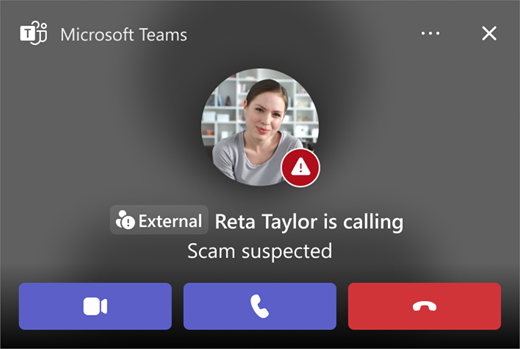
- The "external" tag: Remind users to look for the (external) tag next to a name, as real internal IT support will never have this tag.
- Possessing a sense of urgency -- Attackers often claim there is a "security breach" or "expired password" to rush the user into bypassing safety protocols.
- Out-of-band verification -- Establish a policy that IT will never initiate a support session via a cold-call Teams chat without a pre-existing ticket number. If a user is unsure, be sure to have a pre-established process in place for a user to validate the requestor’s identity.
On any given day, keeping up with the frequency and sophistication of today’s cyberattacks is especially tough considering they’re coming up with new ones that they’ll try and launch by the time you finish reading this blog. But by staying on top of these trends and being proactive with regard to your organization’s cyber resilience, you’ll be better assured to know who is really on your Teams!