


Do you have employees who have a covered to non-covered position life event? Are you not sure? The following steps will help you identify if, and/or which members have this life event in your system.
1. Log into ERM
2. Click on Employer Reports
3. Click on “Member Maintenance Report”
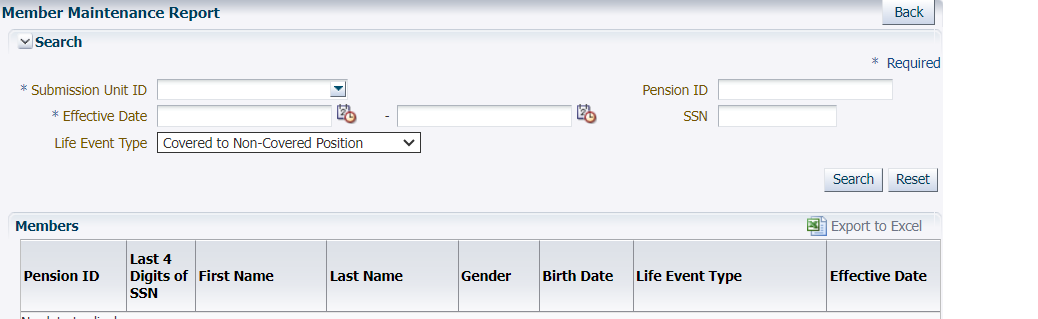
4. Fill in the necessary fields for your unit
- Submission Unit ID
- Effective date: 1/1/1900-current date
- Life event Type: covered to non-covered Position
5. Click search on the right-hand side of the screen
- Click on export to Excel under the search button for a clearer view of your list.
6. Ask yourself, is the member…
- still actively employed with you in the non-covered position,
- moving to a covered position soon, OR
- fully terminated?
If the member is still actively employed with your unit in the non-covered position, no action is needed.
If the member is moving back into a covered position with your unit, then you need to terminate in the system and re-enroll with the new hire date of the covered position.
If the member has separated from your unit, then a termination life event needs to be entered.
When terminating your employees, keep in mind the following:
- The last day in pay (LDIP) is the last day worked in the non-covered position.
- The last check date (LCD) is the last reported payroll date in the system.
It is important that these accounts are correctly entered into the system to ensure that the member can take a distribution or submit for retirement when eligible. If you have any questions, please contact the Employer Advocate team at 888-876-2707.