


Do you have employees who have a covered to non-covered position life event? Are you not sure? The following steps will help you identify if, and/or which, members have this life event in your system.
- Log into ERM
- Click on Employer Reports
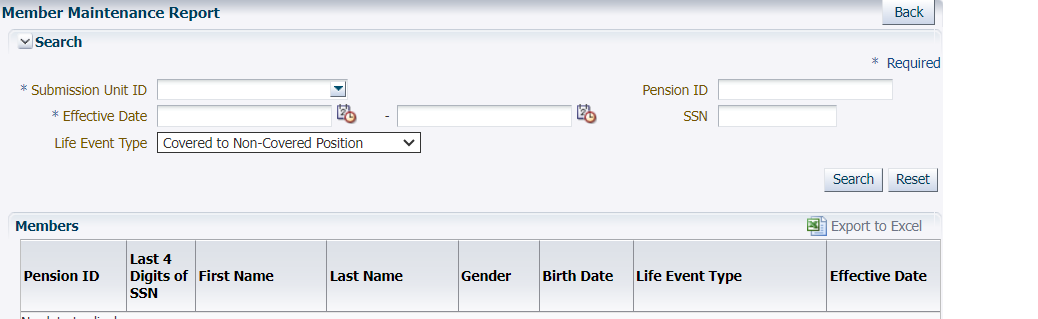
- Click on “Member Maintenance Report”
- Fill in the necessary fields for your unit
- Submission Unit ID
- Effective date: 1/1/1900-current date
- Life event Type: covered to non-covered Position
- Click search on the right-hand side of the screen
- Click on Export to Excel under the search button for a clearer view of your list.
- Ask yourself, is the member…
- still actively employed with you in the non-covered position,
- moving to a covered position soon, OR
- fully terminated?
- If the member is still actively employed with your unit in the non-covered position, no action is needed.
- If the member is moving back into a covered position with your unit, then you need to terminate in the system and re-enroll with the new hire date of the covered position.
- If the member has separated from your unit, then a termination life event needs to be entered.
- The last day in pay (LDIP) is the last day worked in the non-covered position.
- The last check date (LCD) is the last reported payroll date in the system.
When terminating your employees, keep the following in mind:
These accounts must be correctly entered into the system to ensure the member can take a distribution or submit for retirement when eligible. If you have any questions, please get in touch with the Employer Advocate team at (888) 876-2707.