Discover IndianaMap Community Accounts
IndianaMap.org is your gateway to a vast repository of geographic data for the state of Indiana. One of the most powerful features of IndianaMap is the ability to sign up for a Community Account, which not only provides access to the existing IndianaMap datasets but also grants users an ArcGIS Online Creator license—unlocking a suite of advanced GIS tools and data hosting capabilities.
Key Advantages of an IndianaMap Community Account
Signing up for an IndianaMap Community Account gives you a Creator-level ArcGIS Online license, which includes access to 500 credits. Credits can be used for:
- Hosting and Sharing Geospatial Data: Use formats such as shapefiles, CSVs, and geodatabases.
- Accessing Existing IndianaMap Data: Incorporate IndianaMap datasets seamlessly into your projects.
- Running Geoprocessing Tasks: Create buffers, calculate areas, or join features.
- Customizing Datasets: Make your own copy of datasets to customize symbology and pop-ups.
- Accessing ArcGIS Applications: Gain access to Experience Builder, Dashboards, Field Maps, Story Maps, and other applications.
- Geocoding: Utilize Indiana’s custom geocoder or the ESRI World Geocoding service.
- Connecting Multiple AGOL Accounts: Add another AGOL account to your IndianaMap Community AGOL group to utilize data from multiple organizations.
Let’s dive into these key benefits in more detail:
Hosting and Sharing Geospatial Data
As an IndianaMap Community Account holder, you can host and share geospatial data in formats like shapefiles, CSVs, and geodatabases. Whether you’re working on local projects or larger statewide initiatives, you can upload and manage your data in the ArcGIS Online environment. Once your data is hosted, it can be shared publicly, privately, or with specific groups, providing flexibility in how you collaborate or distribute information.
This feature makes it easy to centralize your geospatial data and integrate it into web applications, dashboards, or custom web maps.
Running Geoprocessing Tasks
The 500 credits that come with your ArcGIS Online Creator license allow you to perform a variety of geoprocessing tasks. You can create spatial buffers around features, calculate areas, and join features from different datasets. These tools enable you to perform powerful spatial analysis that can help inform decision-making, whether you're analyzing trends, exploring spatial relationships, or processing large datasets. With the ability to customize your geoprocessing workflows, you can tailor your analysis to meet the specific needs of your project.
Customizing Datasets
Community Account users have the freedom to customize existing datasets by making their own copies. This allows you to modify elements like symbology (the appearance of data on the map) and pop-ups (the information displayed when clicking on map features). Customizing datasets ensures that your maps convey exactly the information you need in the format that best suits your project’s goals.
For example, you can adjust the visual representation of layers to highlight specific trends or features, making your maps clearer and more impactful.
Accessing ArcGIS Applications
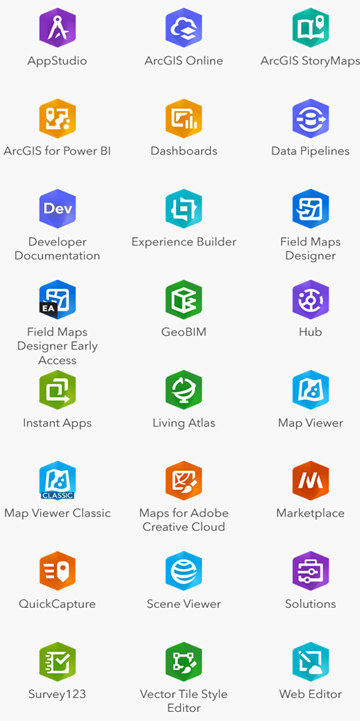
Your Community Account also provides access to a wide range of ArcGIS Applications that are designed to help you create, visualize, and share geospatial data:
- Experience Builder: Create fully customized web apps with interactive maps and data visualizations.
- Survey123: Design and distribute surveys that automatically collect geospatial data.
- Field Maps: Take your data on the go with this mobile app that enables offline data collection and editing in the field.
- ArcGIS Hub: Create collaborative initiatives and share data with your community.
- Story Maps: Build engaging, story-driven maps that combine narrative content with geospatial data.
- Dashboards: Build powerful, real-time data dashboards that visualize geospatial data using charts, gauges, maps, and other visual elements.
Geocoding
Community Account users can perform geocoding, which is the process of converting addresses into geographic coordinates. IndianaMap offers two options for geocoding:
- Indiana’s custom geocoder, which is ideal for accurate, statewide address matching using data collected by the Indiana Geographic Information Office.
- ESRI’s World Geocoding Service, which provides a global geocoding solution but consumes credits.
These geocoding services allow you to add points to your maps based on address data, helping to improve the spatial accuracy of your analyses.
Accessing Existing IndianaMap Data
As a Community Account user, you can easily incorporate IndianaMap’s existing datasets into your projects. This includes authoritative statewide geospatial data that covers everything from land use and transportation to environmental features and public services. You can quickly and easily add this data to your web maps, applications, or analysis workflows, saving you time and effort when sourcing data for your projects.
Connecting Multiple AGOL Accounts
Another feature of the IndianaMap Community Account is the ability to connect multiple AGOL accounts. If you have access to an ArcGIS Online (AGOL) account through another organization, you can join the “IndianaMap Community Data Sharing” group and integrate datasets from both organizations. This allows you to leverage data from multiple sources for your projects, enhancing your ability to analyze and share geospatial information across different platforms.
Let’s do a quick run through on signing up for and accessing your IndianaMap Community Account:
How to Sign Up for an IndianaMap Community Account
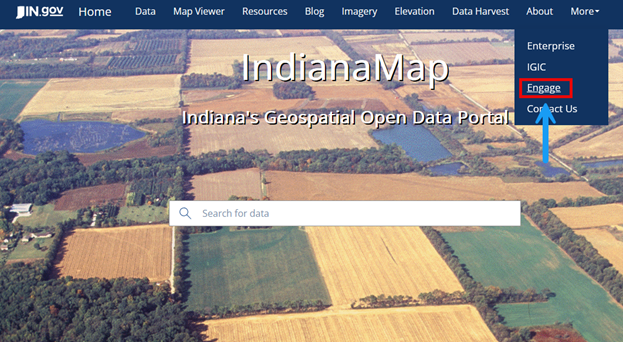
Getting started with a Community Account is easy. Follow these steps:
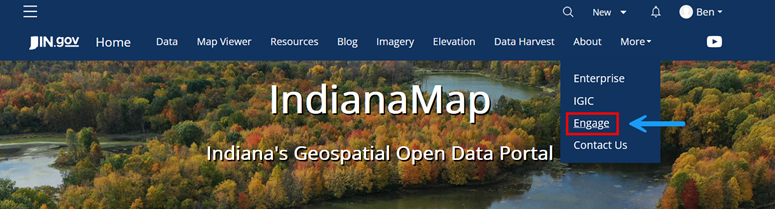
- Visit IndianaMap.org: Head to indianamap.org and click on the "Engage" button in the blue ribbon at the top of the homepage.
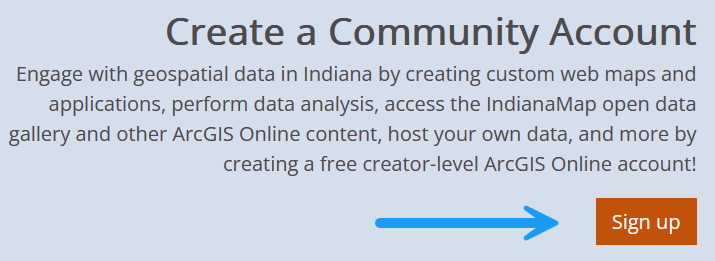
- Click on “Sign Up”: On the Engage page, click the orange "Sign Up" button
.
- Enter Your Details: Provide your first name, last name, and email address, and agree to the ESRI Master Agreement and Privacy Policy.
- Single Sign-On Options: You can also sign up using GitHub, Facebook, Google, or Apple if preferred.
- Activate Your Account: After entering your details, you will receive a confirmation email. Be sure to click the activation link within 24 hours to finalize your account setup.
- Complete Your Profile: Set up a username, password, and security question to finish creating your account.
Finally, let’s go over how you can access your new IndianaMap Community AGOL Account:
How to Access Your IndianaMap Community Account
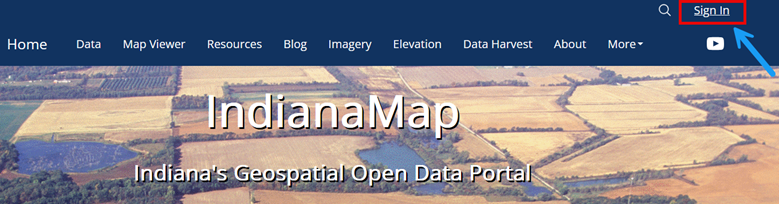
Sign In: Once your account is active, return to the Engage page and click "Sign In." You can now access the full suite of tools and data in the IndianaMap Community ArcGIS Online organization.
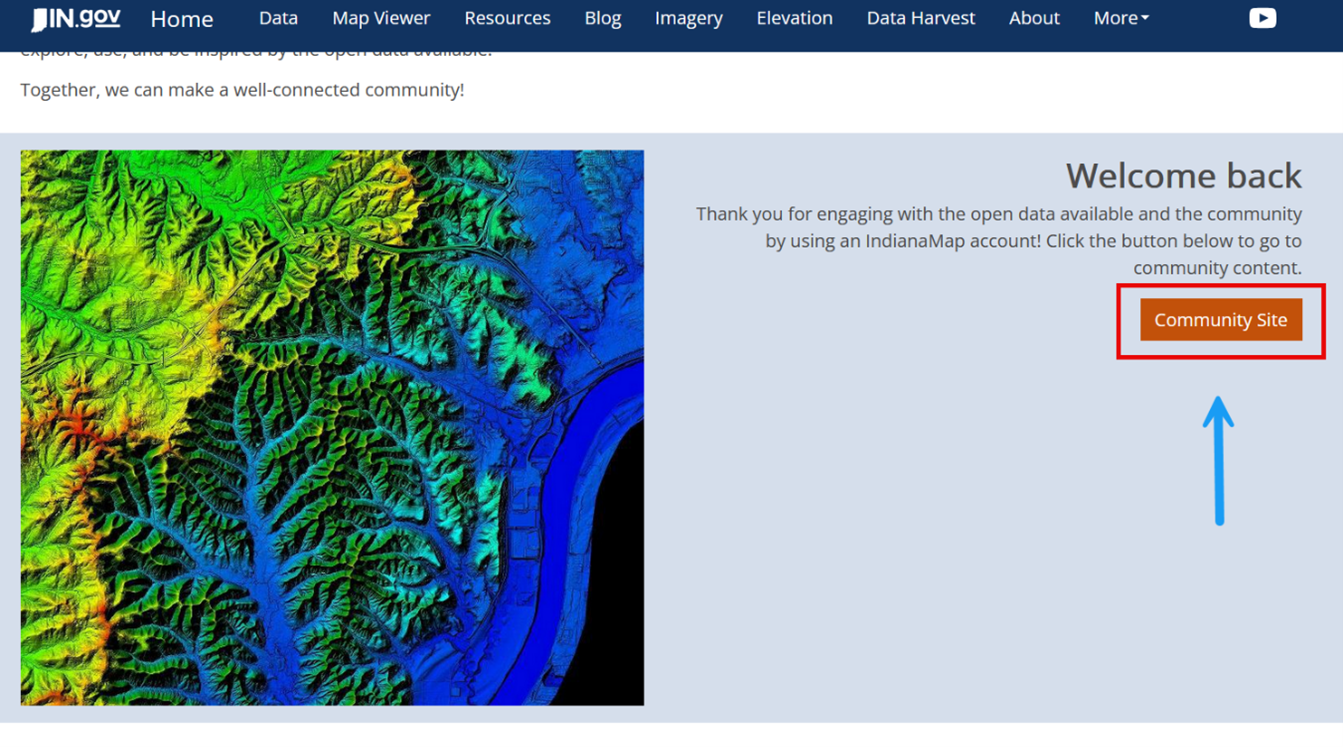
Once signed in: Head back to the "Engage" page. Once there , click on the 'Community Site" button, which will redirect you to the IndianaMap AGOL page.
- Explore AGOL: Now that you’re logged in, you can explore the data gallery, ESRI applications, save, upload, and manage your own content, use the scene and map viewers, and create and manage groups.
- Access AGOL Directly: Instead of going through Indianamap.org to reach your AGOL account, you can navigate directly to https://inmap.maps.arcgis.com and sign in with your credentials.

Contact Us
For additional information and resources on utilizing IndianaMap tools and data, please visit the "IndianaMap FAQs & Guides"section of the IndianaMap website. Additionally, you can reach IGIO IndianaMap staff via email at indianamapsupport@iot.in.gov or follow the "Contact Us" link on the IndianaMap website. For a more detailed tutorial on utilizing your IndianaMap Community Account, please visit the link here.